     | |
 | |
     | |
<<<
Previous Tip Pro/E Tips Library
Next Tip >>>
Pro/E Tips Library
Next Tip >>> | |
Pro/Engineer September 2003 Tip-of-the-Month
Overcoming the 30 Degree Draft LimitationWhen using draft features in Pro/E, there is a 30 degree limitation to the dimension for draft. According to PTC, if the angle is more than 30 degrees, it's no longer draft, but something else. (It's better now - the limit used to be 15 degrees.)
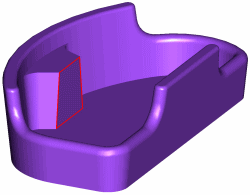
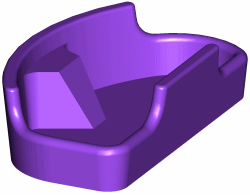
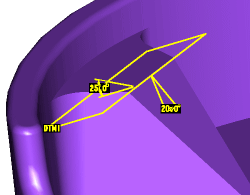
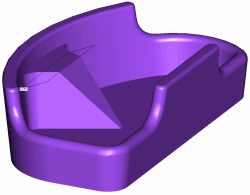
The easiest way to extend a draft angle is to use an angled draft direction plane. In simple terms, the draft angle is measured relative to the "Draft Dir" (or draft direction plane). If you insert a datum at an angle then use that as the draft direction plane, you can effectively achieve draft angles greater than 30 degrees. As an Example, Figure 1 shows a model with a highlighted planer surface to be drafted. The desired draft angle is 45 degrees. Figure 2 shows the 30 degree extent of the Pro/E draft feature. By inserting DTM 1 as shown in Figure 3, then using it as the Draft Dir, the draft angle was effectively extended to 45 degrees. The true draft angle is then the sum of the angles for DTM 1 and the draft feature. It doesn't matter what angle is on what feature (our example shows 20 & 25 degrees), just that the sum is the total draft (in this case 45 degrees). This method is fairly limited because the surfaces are drafted relative to the angled plane. That means curved surfaces end up with a varying draft and new datums must be created for each non-parallel planer surface to be drafted. For non-planer surfaces, the obvious first work around is to create the "Draft" using a Sweep, or for more complicated areas, a Variable Section Sweep. Sweeps are limiting because of the added features required to create them, and because it can become truly complex when dealing with geometry that steps or terminates in a "not so easy to define" manner. If the geometry gets too complex for sweep features, about the only way to accomplish it is with surfaces -- which are usually lots of features and extra work. For more info on sweeps, see our old November 1998 Tip-of-the-Month and the current Pro/Engineer help. The "Draft" shown in the example took 2 simple steps (DTM 1 and the Draft Feature) to create. To accomplish the same task with a more typical approach, (because the 2 side surfaces are not perpendicular to the surface to be drafted) it took 5 features (a sweep, 2 copy surfaces and 2 replaces) to create the same geometry. So, for the right situation, this is a nice trick to use. |
 |
 |
 |
| ||
 |
|
| Design Slide Show | Pro/ENGINEER Tip of the Month | Pro/E Tips Library | Buy the Way | Tech Articles |
| HOME | Who are We? | Our Team/Your Partner | Contact Us | Links & Preferences | Map |
| Copyright © 1996 - SYNTHESIS ENGINEERING SERVICES, INC. : (719) 380-1122 : https://www.SYNTHX.com/ |