|
Datums "On the Fly" or as Discrete Features?
There are 2 ways to make datum planes: Explicitly
(Feature > Create > Datum > Plane > ...), and
Implicitly (Make Datum -- aka "On the Fly").
When should datums be created on "On the Fly", and when should they be placed as
Discrete Features?
The big difference between datums created explicitly and those made "On the Fly" is where the datum
information resides and how accessible it is later.
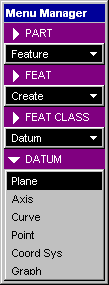 |
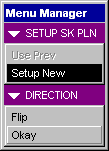
<< Standard Datum
Creation Menus
Menus for Creating
Datums "On the Fly" >>
(Appears during
feature creation)
|
 |
When a Datum Plane is placed explicitly:
- It is a single model feature.
- It is visible on the screen (yellow/red rectangle) as well as in the model tree (by name).
- It is given a name (like DTM5) that can be changed.
- It has attributes that can be modified as needed.
- Any dimensions are easily modifiable as part of the datum feature.
- Most importantly, these datums can be referenced by future features.
When Datum Planes are created on the Fly:
- Multiple datums can be created within the feature.
- They are embedded within the feature they were created for.
- They are not visible (or useful (mostly)) outside just the one feature.
- They have a name (DTM?) but it can't be changed or seen outside that feature.
- They have no modifiable attributes.
- All dimensions for these Make Datums become part of the feature dimensions.
- These datums cannot be referenced by future features.
One of the big benefits of the Make Datum ("On the Fly")
functionality is the datum becomes part of the feature. This makes
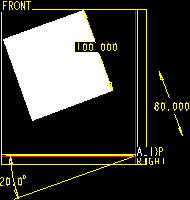
finding dimensions easier. For instance, if a protrusion is created
using both an offset and angle datums, the use of Make Datum functionality
will embed the 2 dimensions within the protrusion. When the protrusion
is modified, these 2 dimensions and all the feature dims will appear together.
Conversely, if the datums are created as discrete features, the offset dimension
is with one DTM feature, the angle dimension is with another, and the protrusion
dims are, of course, with the protrusion feature. If the DTMs are
not visible, the dimensions are harder to find -- especially if someone
else created the model. Datums on the fly also make patterning features much easier.
The advantage of using discrete datums is future features can also reference the datum.
If the model will have several features referencing a plane in space, the DTM should be created explicitly.
If a pattern will include several features built from the same plane (i.e. angular or ref patterns, etc.), a plane
should be created as the first feature.
Another advantage of Explicit datums is the ability to reference and display them in a drawing. This can
be useful with dimensioning and GDT -- depending on your needs. Datums created on the fly can't be referenced
this way.
A couple disadvantages for Explicit datums are:
- The datums will show (with a lot of them, the model can get cluttered).
- Dimensions are found within the DTM feature so if datums are not visible (DTMs off, layers, etc.) control
dimensions are harder to find.
The big disadvantage of datums on the fly is that other features can't reference the same datum. If other
features need the same reference, a plane must be created again, and the dimensions (if any) have to be tied
together using relations or something.
The answer for when to use each type is fairly simple. If other features need the same
reference (location, patterns, GDT, etc.), or if the plane must be visible, make it explicit. If the datum
dimensions belong within the feature, make it on the fly.
** Another great use
for datums on the fly is sketcher orientation. Sometimes when features
are created (especially in complicated geometry) it's hard to find a perpendicular
reference. This is a perfect time to use the Make Datum option and
build a quick Datum on the fly.
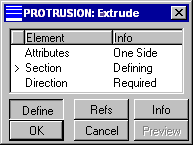
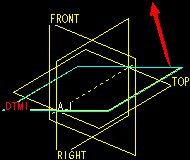
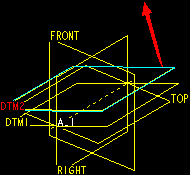
** An example of creating multiple sequential Datums on the fly is shown in the steps below:
Have a Great Datum Day!
|